
What is Model Context Protocol (MCP)? Learn how MCP connects AI tools to data, apps, and workflows—and why it matters for the future of AI.
Artificial intelligence can answer questions, write content, generate code, and help people complete many tasks. However, an AI model may need access to external information and software before it can perform more useful, real-world actions.
That is where the Model Context Protocol (MCP) comes in.
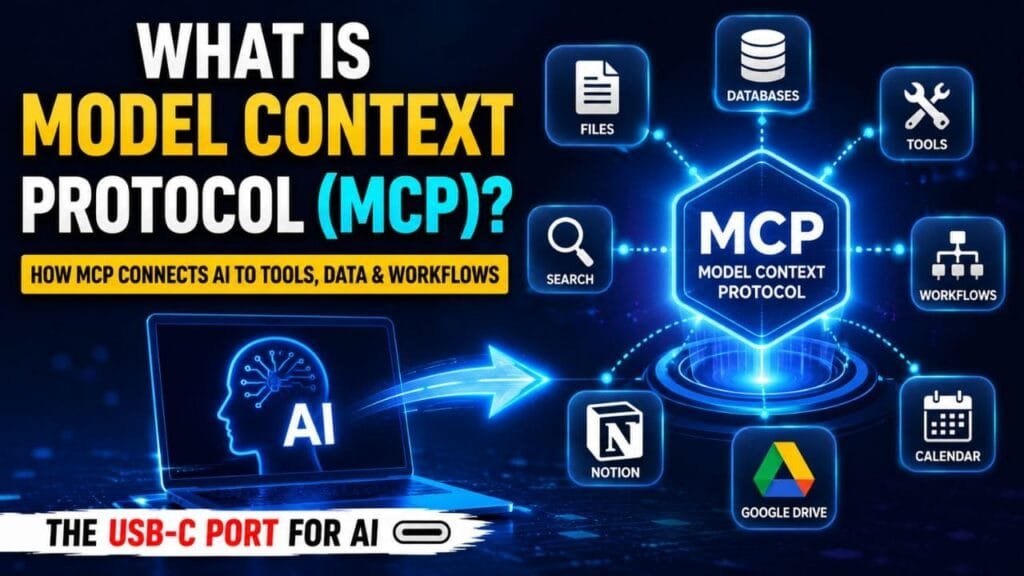
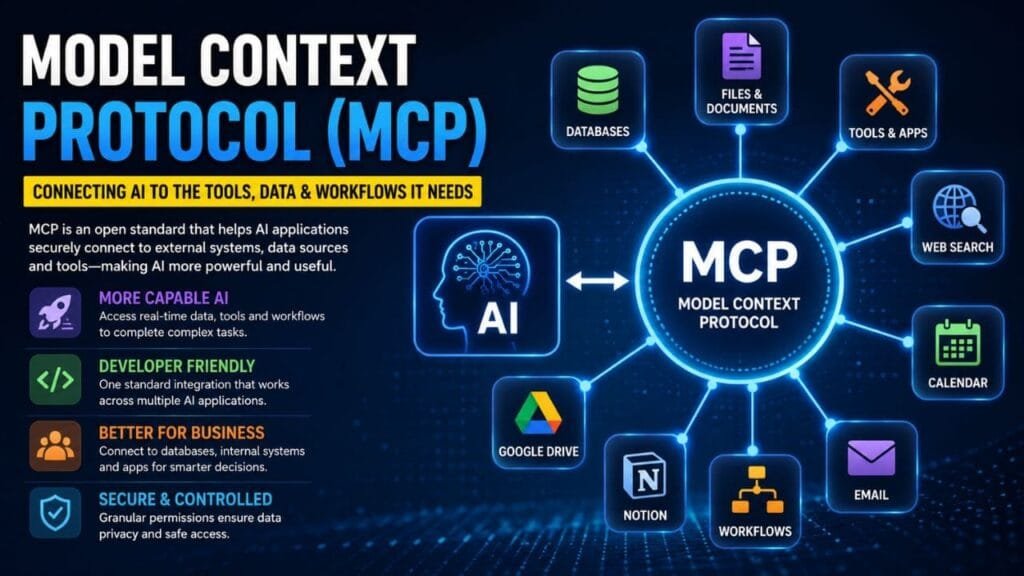
Model Context Protocol, commonly called MCP, is an open standard that helps AI applications communicate with external tools, data sources, and software services. It provides a common method for connecting AI assistants with resources such as files, databases, calendars, search tools, and business applications.
Table of Contents
Instead of building a completely different connection for every AI tool and software platform, developers can use MCP to create a more consistent way for systems to work together.
A simple comparison is to think of MCP as a universal connector for AI. Similar to how a standard port helps compatible devices communicate, MCP helps AI applications interact with approved tools and information.
What Does MCP Do?
MCP helps an AI application access information or use tools outside the AI model itself.
For example, an AI assistant may need information stored in a company database or a user’s connected workspace. Without a connection, the AI may not be able to access that information directly.
With an approved MCP connection, the AI can request relevant data or use an available tool to help complete a task.
Depending on the system’s setup and permissions, MCP can help AI applications:
- Read information from local files
- Search connected databases
- Access approved calendars
- Retrieve information from productivity platforms
- Use tools such as calculators or search services
- Work with software applications
- Support automated workflows
- Complete selected actions with user approval
MCP does not automatically give an AI assistant access to everything on a device or account. The available access depends on the permissions and rules established by the user, developer, or organization.
How Does Model Context Protocol Work?
MCP creates a structured connection between an AI application and an external service.
In a basic MCP setup, there are usually three main parts:
1. The AI Application
The AI application is the program a person uses to communicate with an AI model.
It may be an AI chatbot, coding assistant, business tool, or AI agent. The application sends requests and displays the results to the user.
Get the latest AI news, technology updates, tutorials, and in-depth analysis delivered directly to your screen.
▶ Subscribe on YouTube2. The MCP Connection
The MCP connection provides a standardized way for the AI application to communicate with external tools and resources.
It helps organize how requests are sent, how information is returned, and how tools are made available to the AI system.
3. The External Tool or Data Source
The external system may be a database, file system, calendar, productivity platform, search tool, or another software service.
When the AI needs information or wants to use a tool, it can communicate with the connected system through MCP.
What Can Model Context Protocol Enable?
MCP can support many different AI use cases. As more software platforms adopt the protocol, AI assistants may become better at working with information, applications, and digital workflows.
1. More Helpful Personal AI Assistants
An AI assistant could connect with approved services such as calendars, notes, and task-management tools.
For example, a user might ask:
“What meetings do I have tomorrow?”
The AI could check a connected calendar and provide a summary.
A user could also ask the assistant to find information in saved notes, organize tasks, or summarize project updates.
This could make AI assistants more useful because they can work with relevant information instead of relying only on what a user types into the chat.
2. Faster Software Development
MCP can help AI coding tools interact with development resources, project files, documentation, and design platforms.
For example, an AI coding assistant may use information from a design file to help create parts of a website or web application.
This could reduce repetitive work and help developers move faster from an idea or design to working code.
However, AI-generated code should still be reviewed and tested. Developers may need to fix errors, improve security, check performance, and make important technical decisions.
3. AI-Powered Business Search
Many companies store information in separate systems. Employees may need to search through multiple databases, documents, and internal tools to find answers.
MCP can help connect AI applications with approved business resources.
An employee might ask:
“What were our top-selling products last quarter?”
The AI could search connected data sources and present the results in a clear, conversational format.
This may make business information easier to find and reduce the time spent switching between different software platforms.
4. AI-Assisted Design and 3D Creation
MCP can also support workflows involving creative and technical software.
For example, an AI system could work with a 3D design application to help create or modify a digital model. The finished design could then be prepared for a compatible 3D printer.
This may help designers complete certain tasks more efficiently. Human review is still important because the final design must meet the required quality, safety, and technical standards.
Why Is MCP Important?
MCP matters because AI applications are becoming more useful when they can work with tools and information beyond the AI model.
Without a shared standard, developers may need to build separate integrations for each AI application and external service. This can require additional time, increase maintenance work, and make it harder to scale AI systems.
MCP offers a common framework that can simplify these connections.
Its benefits may be different for developers, AI companies, businesses, and everyday users.
Get the latest AI news, technology updates, tutorials, and in-depth analysis delivered directly to your screen.
▶ Subscribe on YouTubeBenefits of MCP for Developers
Developers can use MCP to create AI integrations through a more standardized approach.
Potential advantages include:
- Less time spent building separate connections
- Reduced integration complexity
- More reusable AI tool connections
- Easier support for compatible AI applications
- Faster development of AI agents and AI-powered software
A shared protocol can help developers focus more on creating useful features instead of rebuilding similar integrations repeatedly.
Benefits of MCP for AI Applications
AI applications can become more capable when they can use trusted tools and access relevant information.
MCP can help AI systems connect with:
- Databases
- File systems
- Search tools
- Productivity applications
- Development platforms
- Business software
- Automated workflows
These connections may allow AI assistants to provide more useful answers and support tasks that require information from outside the model.
Benefits of MCP for Users
For users, MCP may lead to AI assistants that can do more than generate text.
With the correct permissions, an AI assistant may be able to:
- Find information in connected files
- Review upcoming calendar events
- Search approved business data
- Organize tasks
- Use software tools
- Help automate repetitive work
- Complete selected actions after user approval
This could make AI tools feel more personalized and practical.
Which AI Tools Support MCP?
MCP is an open protocol, and support is expanding across the AI and software ecosystem.
AI assistants, coding tools, development environments, and other platforms are adding MCP-related features. Examples include AI applications such as Claude and ChatGPT, along with development tools such as Visual Studio Code, Cursor, and other MCP-compatible platforms.
Wider support is important because developers may be able to create an integration that works with multiple compatible applications.
This can reduce the need to build a separate connection for every AI platform.
Is Model Context Protocol Safe?
MCP can support controlled connections between AI applications and external systems, but security depends on how each connection is created and managed.
Before connecting an AI tool to important information, users and organizations should check:
- What information the AI can access
- Which tools the AI is allowed to use
- What actions the AI can perform
- Whether approval is required before an action
- Whether the MCP server is trustworthy
- How sensitive information is protected
Users should be careful when connecting AI tools to private accounts, personal files, financial information, or business systems.
It is generally safer to provide only the permissions needed for a specific task instead of giving an AI application broad access.
What Is the Future of MCP?
AI assistants are moving beyond simple question-and-answer systems. Many new AI tools are designed to search for information, use software, complete multi-step tasks, and interact with digital services.
MCP could help support this shift by making it easier for AI applications to connect with external tools and data.
As adoption increases, MCP may become an important part of how AI agents work across different platforms.
However, greater connectivity may also create new challenges involving:
- Data privacy
- User permissions
- Security risks
- Tool reliability
- Access control
- Human oversight
The future success of MCP will depend not only on broad adoption but also on responsible implementation.
Final Thoughts
Model Context Protocol (MCP) is an open standard that helps AI applications communicate with external tools, software, and data sources.
It can make AI systems more useful by allowing them to access approved information and interact with connected services. Developers may benefit from simpler integrations, businesses may gain more capable AI tools, and users may receive more personalized assistance.
In simple terms, MCP acts as a shared connection framework for AI.
As AI assistants become more involved in everyday work and digital tasks, standards such as MCP may help different tools and services communicate more efficiently. At the same time, security, privacy, permissions, and human control will remain essential.
🔔 Connect With Us
Stay updated with the latest Update,
👉 Join us on WhatsApp – Link
👉 Join our Telegram Channel – Link
👉 Follow us on X (Twitter) – Link
👉 Follow us on Instagram – Link
👉 Like our Facebook Page – Link
👉 Follow us on Threads – Link
📩 Contact & Support
Have questions, feedback, support requests, collaborations, or business opportunities?
Feel free to reach out:
📧 Business Inquiries: contact@easylearnguide.com
📧 Support & General Assistance: support@easylearnguide.com
Frequently Asked Questions (FAQs)
1. What is Model Context Protocol (MCP)?
Model Context Protocol (MCP) is an open standard that allows AI applications to connect with external tools, data sources, software, and services. It helps AI assistants access approved information and perform useful tasks through a standardized connection.
2. How does Model Context Protocol work?
MCP works by creating a structured connection between an AI application and external systems. An AI assistant can use this connection to retrieve information, access approved resources, or interact with tools based on the permissions provided by the user or organization.
3. What is an MCP server?
An MCP server is a program or service that provides AI applications with access to specific tools, resources, or data. It acts as a bridge between an AI assistant and an external system, allowing the AI to use approved capabilities through the MCP standard.
4. What can MCP do for AI agents?
MCP can help AI agents access connected files, databases, calendars, search tools, business software, and other applications. This can allow AI agents to answer more relevant questions, automate selected workflows, and complete tasks using approved external tools.
5. Is Model Context Protocol secure?
MCP security depends on how the connection, permissions, and external tools are configured. Users should connect only trusted MCP servers, review what data an AI application can access, and provide only the permissions needed for a specific task.
6. Which AI applications support MCP?
MCP support is growing across AI assistants, coding tools, development environments, and business software. Support may vary by platform and can change over time, so users should check the official documentation of an AI application for the latest MCP features and compatibility.
7. Why is Model Context Protocol important?
Model Context Protocol is important because it provides a common way for AI applications to connect with tools and data. It can reduce the need for separate custom integrations, help developers build AI-powered applications more efficiently, and make AI assistants more useful for everyday and business tasks.